Deadline-aware planning · web, iPhone and Android
Your to-do list doesn’t know whether you’ll make it. This one does.
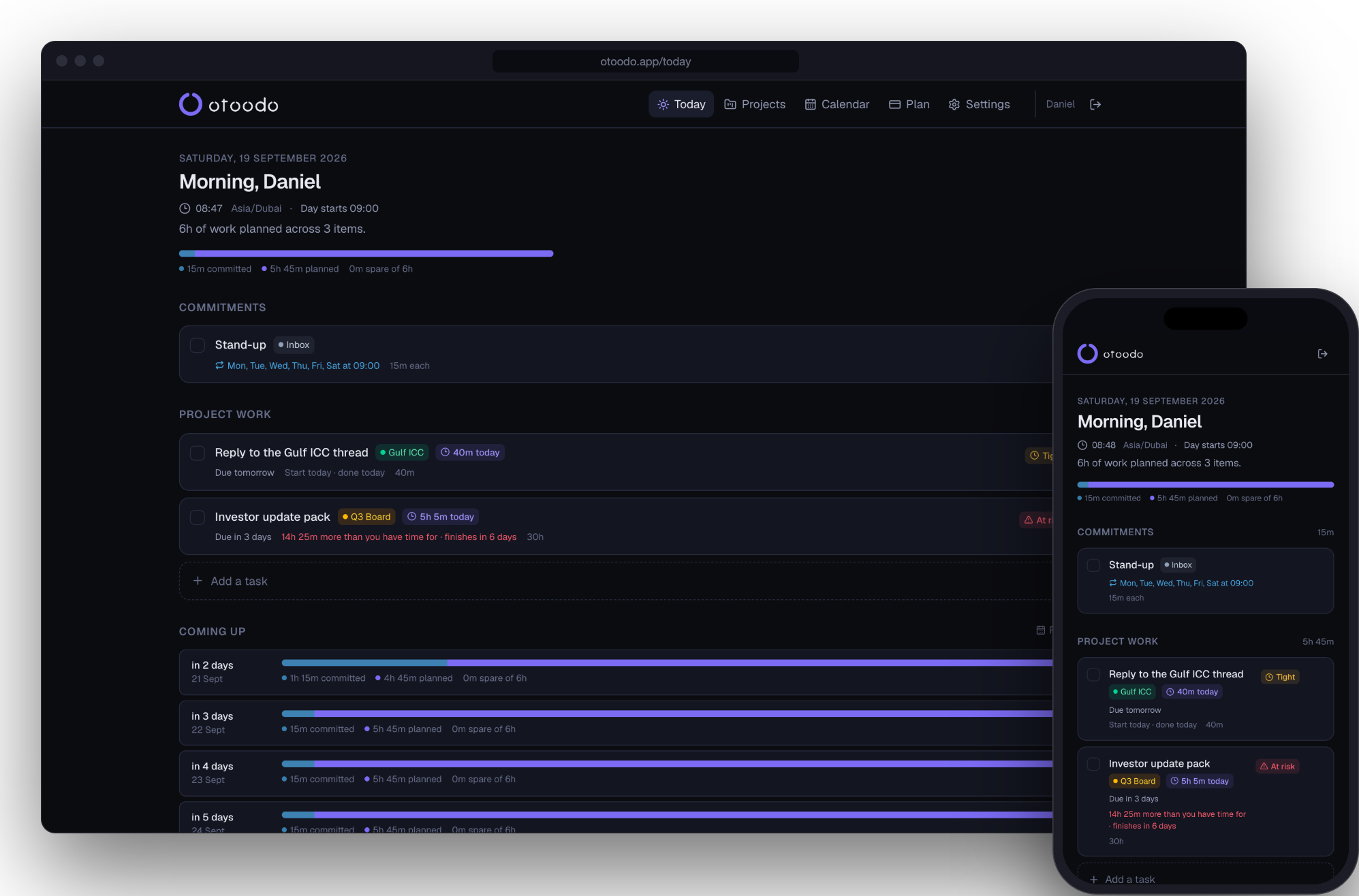
Tell otoodo what needs doing, when it’s due, and roughly how long it’ll take. It works out what today has to contain for everything to land on time — and when that’s arithmetically impossible, it says so, in hours, before the week starts rather than after it ends.
No card. Free plan forever after that. Free apps for iPhone and Android.
Can you actually make it?
Drag these. This is the same test otoodo applies to every deadline you give it.
62h of work · 48h available
You are 14h short. Three fixes, and there is no fourth:
- — find 1h 45m more in every working day
- — move the date 3 days later
- — cut 14h of scope
otoodo runs this against every deadline you have at once, then works backwards to what today must contain. That is the whole product.
Every other to-do app takes your work and hands it straight back, in order.
Sorting is not planning. A list sorted by due date still doesn’t know that the four things due Friday need eleven hours and you have six. It will show you all four, cheerfully, on Thursday night.
So the arithmetic falls to you — every morning, in your head, across a dozen commitments. Most people don’t do it. They find out on Friday.
A planner that fills every day to the brim isn’t the answer either. That just puts work due in three months on today’s list, and a list you can’t finish is one you stop believing.
The useful question is narrower and much harder: what do I need to touch today so that everything still lands on time?
A planner that fills every day
Everything lands on time. Today is a wall, and day six onwards is empty.
otoodo
Everything lands on time. Every day is doable, and today is a list you'll finish.
How the planning works
No AI guessing at your priorities. Four rules, applied in order, every time you change anything — and every one of them plain arithmetic with tests under it, not a model’s opinion about what matters.
- 01
Your hours, honestly
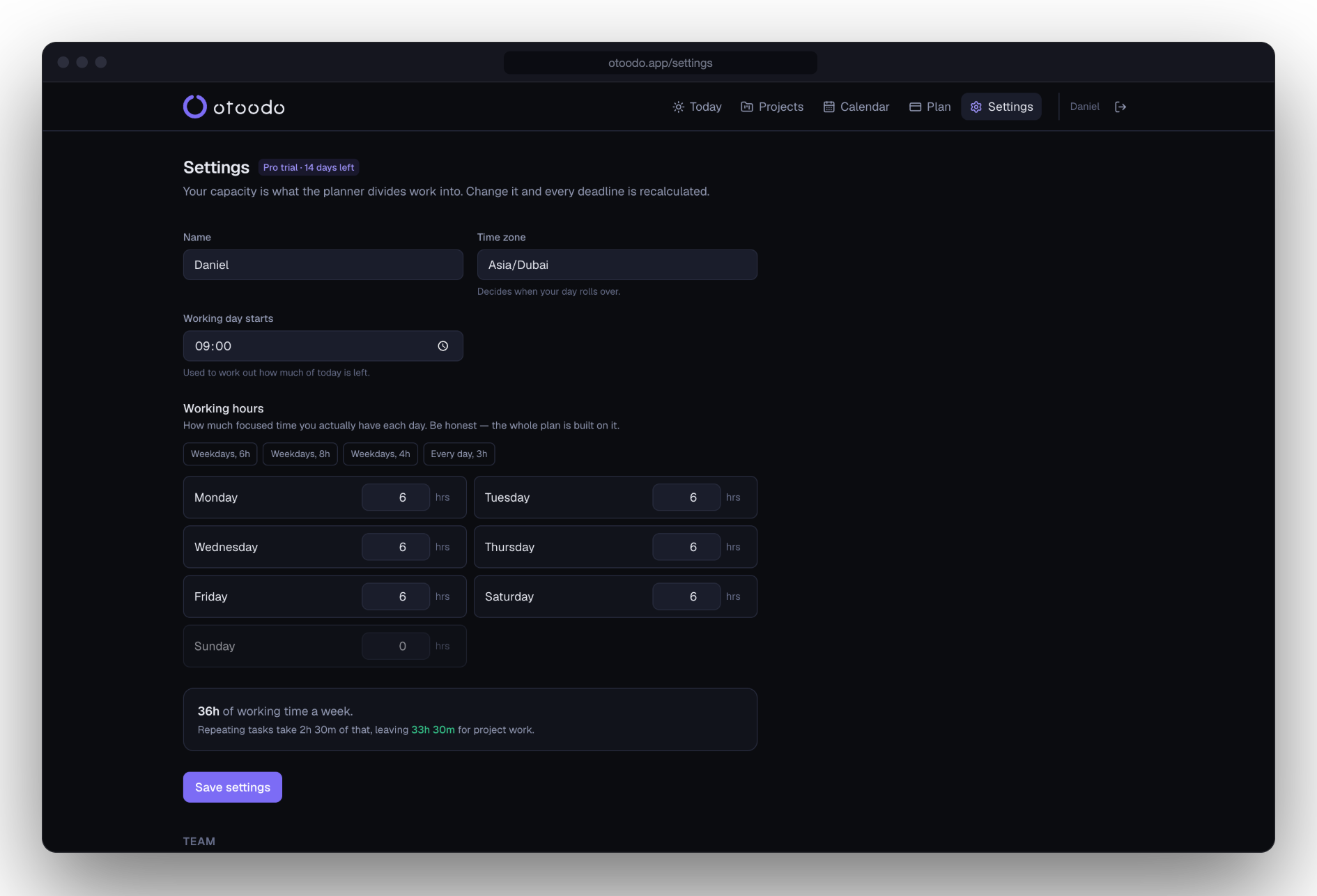
Set how many focused hours each weekday actually holds — not how many you're at a desk. Override single days for holidays, half days, or a Saturday you're working.
- 02
Commitments come off the top
A stand-up every weekday at 09:00 isn't something a planner gets to move. Recurring work is subtracted from the day before anything else is considered.
- 03
Deadline work is spread, not crammed
A 10-hour task with 10 working days left asks for an hour a day. When a day is oversubscribed the nearest deadline wins the contested hours — and nothing is ever scheduled in slices under 30 minutes.
- 04
And it tells you when it can't
Feasibility is decided exactly, not guessed: for every deadline, does the work due by then fit in the hours available by then? If not you get the shortfall in hours, and three honest options.
What it looks like with a real week in it
One account, eleven tasks, four projects, 51 hours of work and not enough days. These are screenshots, not illustrations.
Settings
Start with the hours you actually have
Six focused hours on a weekday is a good week for most people, and the planner is only as honest as this number. It shows what your repeating commitments take off the top before any deadline work is placed: here, 2h 30m out of 36.
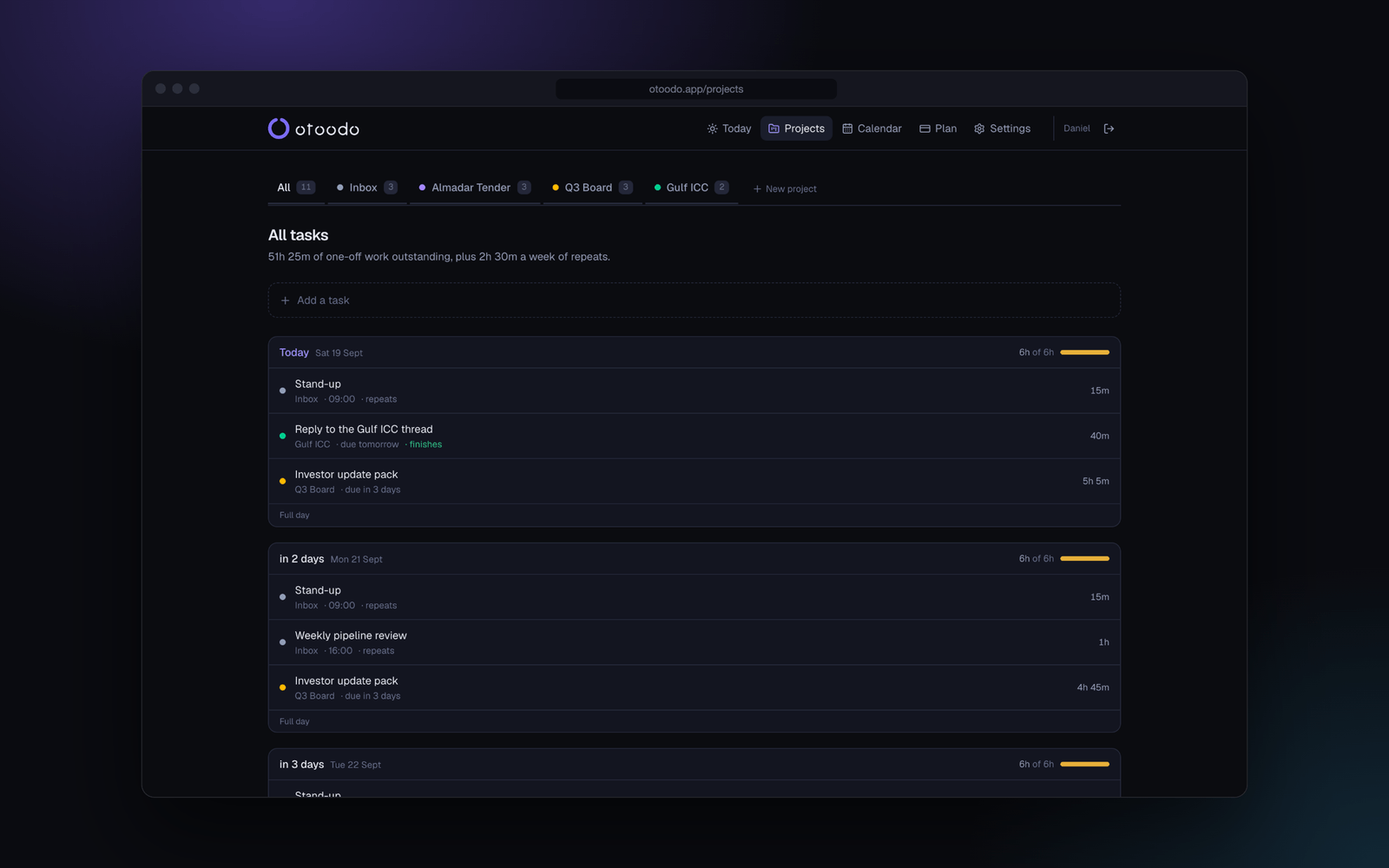
Projects
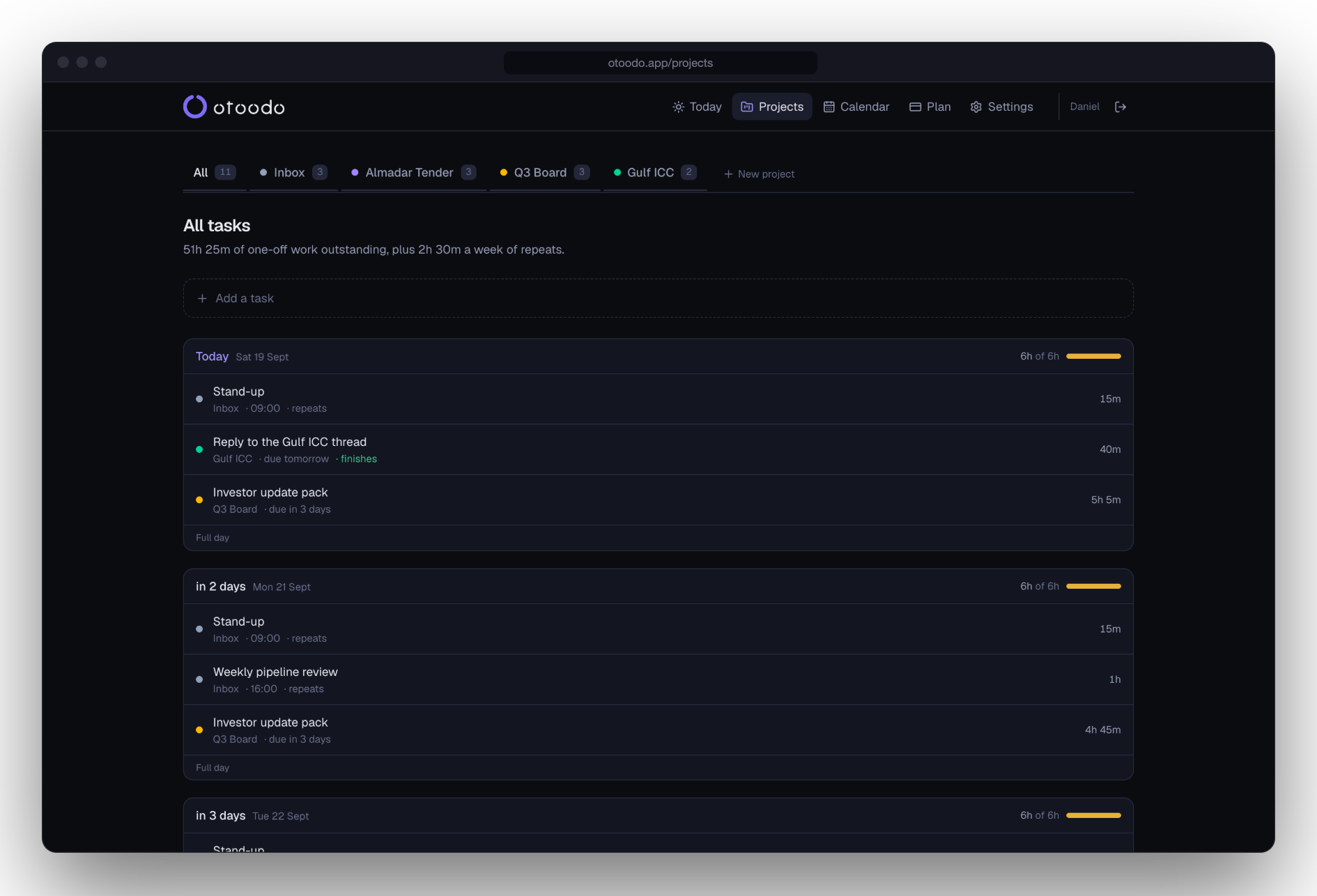
Every day, and what it has to hold
Each task is spread across the days between now and its date, and each day shows how full it is against the hours you gave it. A due date in red is one the arithmetic says will be missed, days before it is.
Calendar
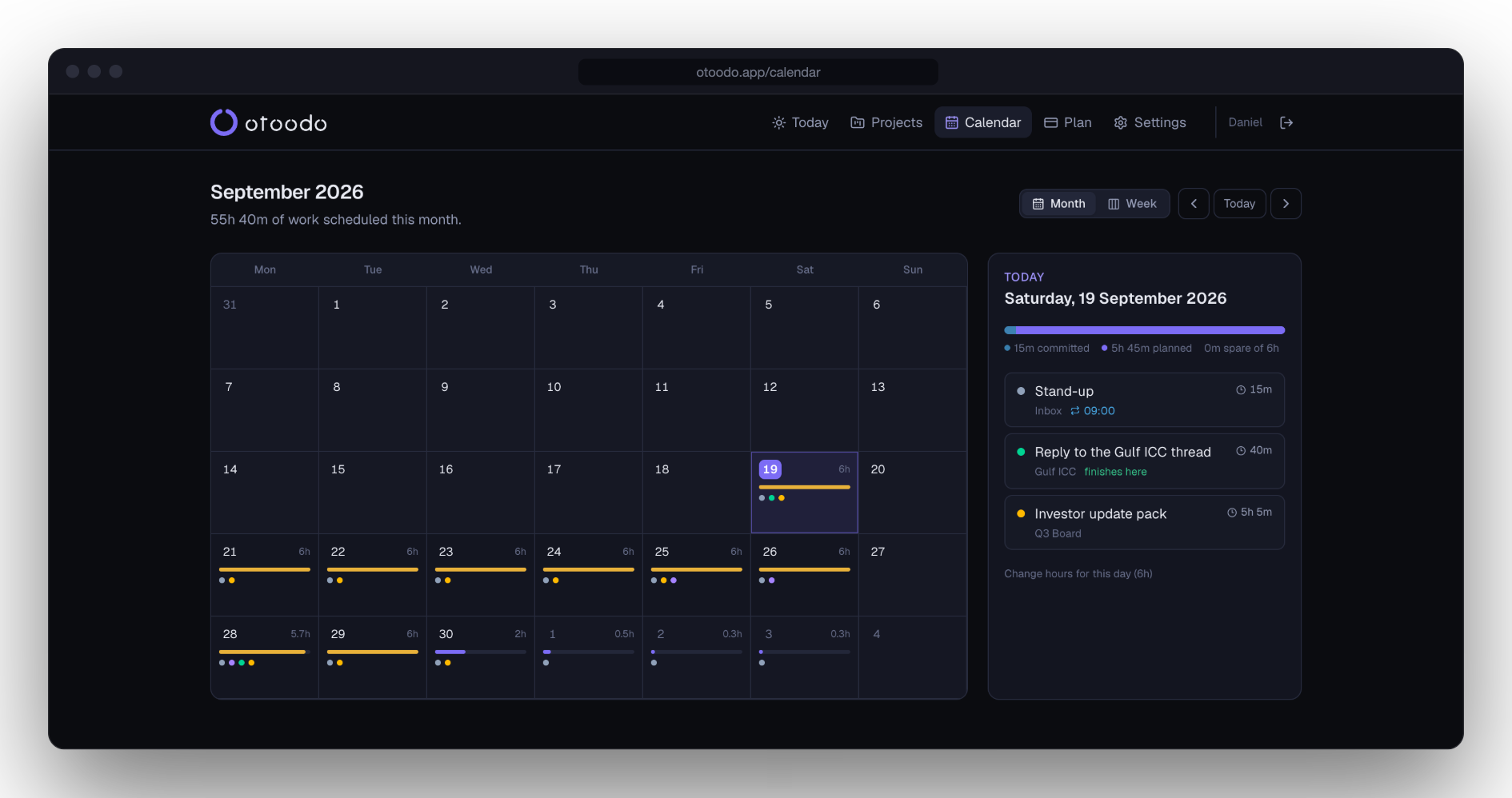
A month you can read as load, not appointments
A bar per day, amber when it is full. Two solid weeks of amber is a fact worth having before you agree to anything else that lands inside them.
What’s in it
A month you can read at a glance
The calendar is a load map, not a grid of appointments. An overloaded week is visible before you walk into it.
A week you can move work around on
Seven columns of cards, one per day per task. Drag a card onto a day and it stays there. Past days show what was actually done, not what was planned.
Pin work to a day and mean it
Eight hours pinned into a six-hour Thursday reads as over, not as an hour quietly leaking into Friday. The deadline is left alone, so a pin past it is late and says so.
Delegate, and plan their week tooPro
Assign work to someone else and it comes out of their hours, not yours — each person with their own working week. You still see everything.
Add work by talking to itPro
“Hey Siri, add to otoodo: review the tender docs by Friday, about three hours.” It reads back the date it chose, so a misheard one is caught in the same breath.
One email, Monday morning
How much work the next seven days hold against how many hours are in them, and anything that no longer fits. Sent at 07:00 in your timezone, not ours.
Three weeks, worked through
Illustrative examples, not customer stories — otoodo is new, and it would rather show you the sums than invent a quote. If one of these is your week, the arithmetic is the same.
An independent consultant
Five client deliverables due in the next ten working days: 9h, 6h, 12h, 4h and 8h. Five focused hours a day, less a 30-minute daily check-in.
39h of work · 45h of capacity
Fits, with 6 hours spare
But the 9-hour and 12-hour pieces are both due by day four. Only 18 hours exist by then and 21 are due. Three hours short on Thursday, in a fortnight that fits overall.
A five-person studio
A 40-hour site build due in two weeks, assigned to a developer who works six focused hours a day and already carries 25 hours of other work due in the same fortnight.
65h of work · 60h of capacity
5 hours short
The principal sees it on the day the work is assigned, from one screen, without the developer logging in to anything. Moving 5 hours to someone with room fixes it before it is a problem.
A bid manager
A 30-hour tender response due in 15 working days, alongside a standing 90 minutes a day of meetings in a six-hour day.
30h of work · 67h 30m of capacity
About two hours a day, from today
Nothing is late, so nothing warns. The plan simply asks for about two hours today and every day after, rather than letting week three carry all thirty.
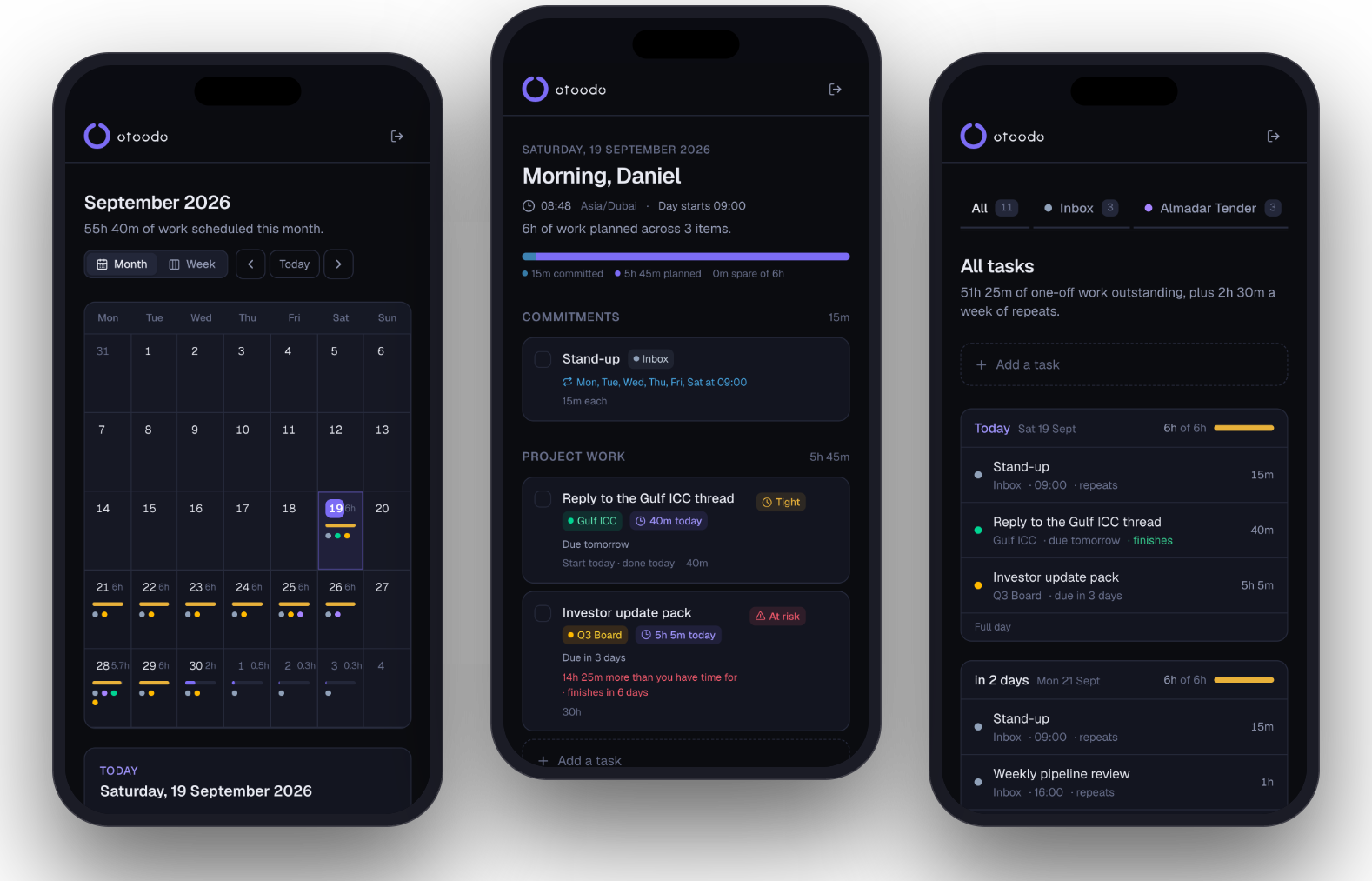
iPhone and Android
The same plan, in your pocket, for nothing.
Not a companion app with three of the features. It is the whole planner — Today, the week board, the calendar load map, the warnings — signed in to the same account, so what you change on a laptop is already true on your phone.
- Free to download, and free to use on the free plan
- Opens on Today, so the answer is the first thing you see
- Tells you when you're offline instead of quietly failing to save
- Plans and payment are handled on the website
Not in the stores yet. The web app already works on a phone today, and installs to a home screen from the browser.
Free for one person. Nine dollars when it is a team.
The free plan is the whole planner, not a demo of it. Pro is for the day you start planning other people’s weeks as well as your own.
Free
The planner, for one person and a handful of projects.
Freeforever
- Unlimited tasks and recurring commitments
- Up to 3 projects
- Holidays, half days and one-off working Saturdays
- Today, Calendar and the full planner
- Deadline warnings with the exact shortfall
- Working hours per weekday
Pro
Delegate work, talk to it, and plan a whole team's week.
$79a year
or $9 a month · 14 days free, no card
- Everything in Free
- Unlimited projects
- Delegate work to unlimited team members, each with their own hours
- Add tasks by voice through ChatGPT or Siri
- Export everything you have, any time
- Email support
Prices in US dollars, excluding VAT. The detail, and what happens when the trial ends.
Already using something else?
Most of these are good products with more engineering behind them than otoodo has. Each comparison starts by saying who should genuinely pick them, because usually there is a real answer.
- vs TodoistTodoist is a genuinely excellent to-do app with over a decade of polish, and for most people most of the time it is the right choice. The difference is narrow and it matters only if you commit to dates: Todoist can record how long a task will take, but it has no model of how many hours your Tuesday actually holds — so it can never answer whether the four things due Friday fit in the time before Friday.
- vs MotionMotion is the closest thing to otoodo on this list, and it is a bigger, more capable product: it does auto-schedule around your capacity, and it does warn you when a deadline is at risk. If you want your calendar actively managed, Motion is the better tool and it is not close. The differences that matter are what it does to your calendar, what it asks of your team, and what it costs.
- vs NotionThese are not really the same kind of thing. Notion is a workspace where you assemble whatever you need out of databases, and people build genuinely impressive task systems in it. What none of those systems do is arithmetic against your actual available hours — a Notion database can hold an estimate and a due date, but it has no notion of how many hours your Tuesday holds and no scheduler to spread work across the days before a deadline.
What otoodo won’t do
It won't make your day longer.
When the numbers don't work there are exactly three fixes: more hours, a later date, or less work. otoodo will tell you which one you need and by how much. It will not pretend there is a fourth.
It won't guess your estimates.
The plan is only as good as the hours you put in. Rough is fine — being wrong by twenty per cent still beats not knowing.
It won't hold your data hostage.
One click exports everything you have as JSON, on any plan, including the free one. Delete your account and it all goes, immediately.
From the writing
Worked examples with real numbers. Useful whether or not you ever sign up.
How to say no to more work4 min read
Saying No to More Work is Easier with a Number in Your Hand
Learn how to say no to more work effectively with clear numbers. Use otoodo's deadline-aware planning to assert your limits.
Read it →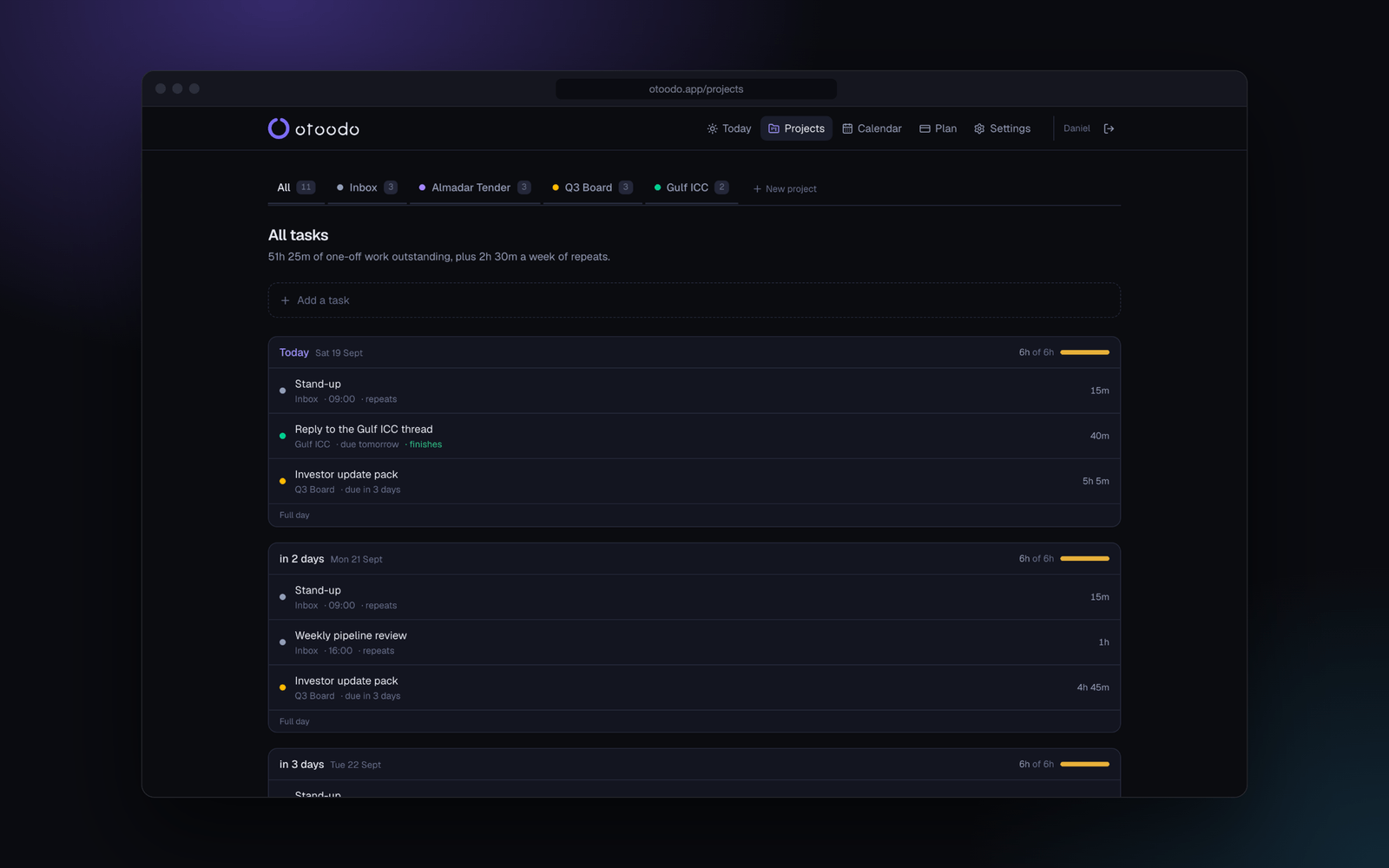
Pomodoro technique5 min read
Pomodoro Measures Effort. Deadlines Are Measured in Finished Hours
Learn how the Pomodoro technique can enhance focus, but understand its limitations in meeting deadlines. Discover how otoodo helps manage your workload.
Read it →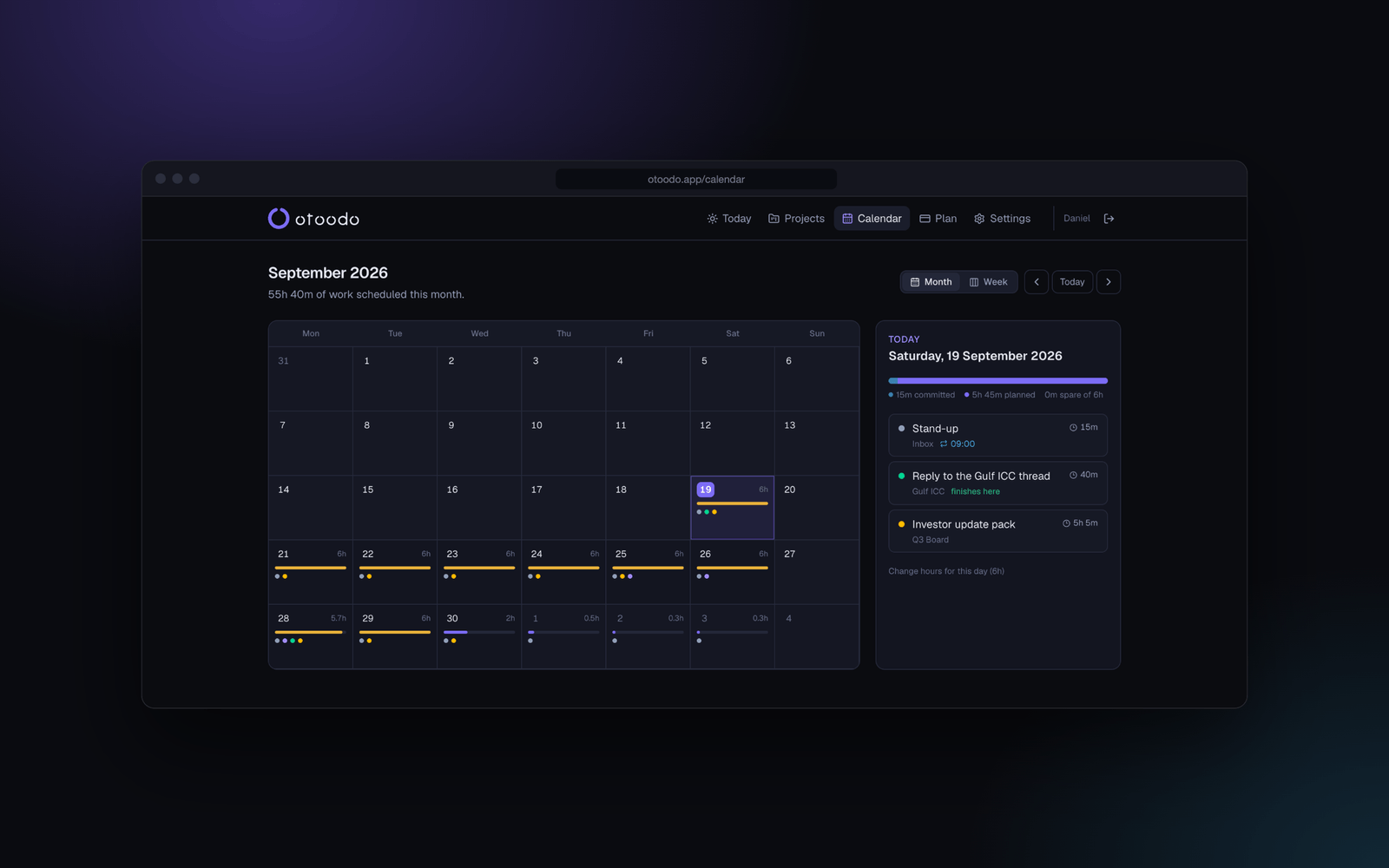
Realistic deadlines4 min read
How to Set a Deadline You Will Actually Hit
Learn how to set realistic deadlines by working backwards from your available hours, not just the calendar date.
Read it →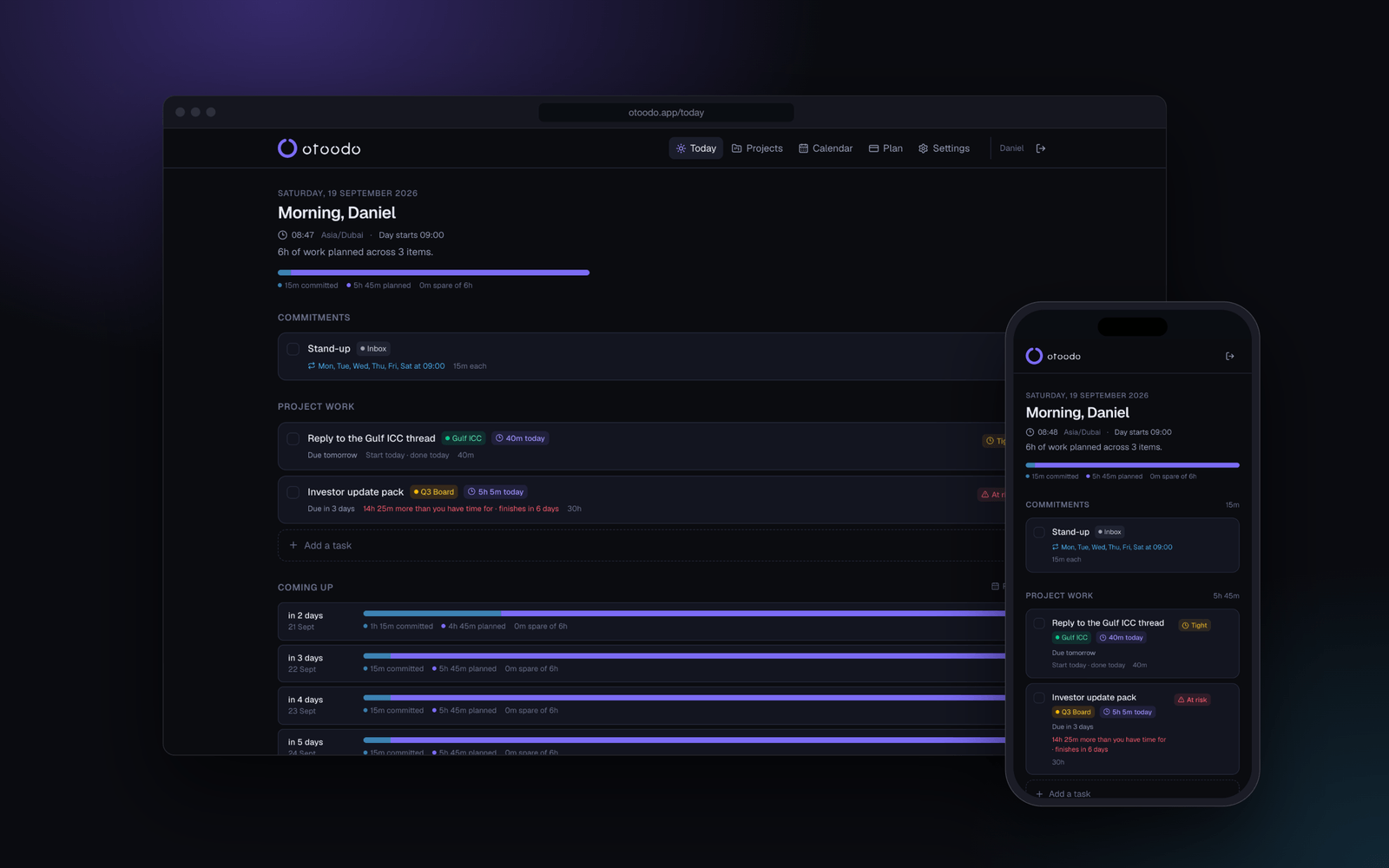
How to organise a to-do list5 min read
Organise Your To-Do List by Date and Hours, and Most of the Sorting Disappears
Learn how to organise a to-do list effectively by focusing on due dates and time estimates, reducing clutter and confusion.
Read it →
Questions
How is this different from Todoist or Things?
Those sort your work; otoodo does arithmetic on it. It knows how many hours each of your days holds, how long each task will take, and when each is due — so it can say what today must contain, and tell you in hours when a deadline is already impossible. A list sorted by due date will show you all four things due Friday, cheerfully, on Thursday night.
Do I have to estimate every task?
Yes, roughly. Every task defaults to one hour, so you can move fast and correct later. The plan is only as good as the estimates — but being wrong by twenty per cent still beats not knowing, and the estimate you gave is right there to fix the moment a task turns out to be bigger.
What happens when the numbers don't work?
You are told, in hours, before the week starts rather than after it ends. Feasibility is decided exactly: for every deadline, does the work due by then fit in the hours available by then? If it does not, otoodo names the shortfall and the three fixes — more hours, a later date, or less work. It will not pretend there is a fourth.
Is there an iPhone and Android app?
Yes, and both are free. They are the same planner, signed in to the same account, so what you change on a laptop is on your phone by the time you look at it. Plans and payment are handled on the website.
Can I use it with my team?
You can delegate work to other people on the Pro plan. Each person has their own working week, and delegated work is planned against their hours rather than yours, so a task you hand over stops competing for your day and starts competing for theirs. They do not need their own login.
Can I add tasks by voice?
Yes, on Pro. otoodo exposes an API that a ChatGPT custom action or an iOS Shortcut can call, so you can say what needs doing and hear back the date it chose — which is how a misheard deadline gets caught in the same breath it was said.
Can I get my data out?
One click, on every plan including the free one, exports everything as JSON. Deleting your account removes all of it immediately. There is no export tier and no waiting period.
What does it cost?
Free for one person with up to three projects, and that plan keeps the whole planner — the deadline warnings, the calendar, the working hours, all of it. Pro is $9 a month or $79 a year and adds unlimited projects, delegation and the voice endpoint. Every new account starts with 14 days of Pro and no card.
Find out on Monday, not on Friday.
14 days of Pro, no card. A free plan that stays useful after that, on the web and on your phone.
Create your account